
Description
Features
Connects 2 USB-C Sources to a Single HDMI Monitor, Keyboard and Mouse
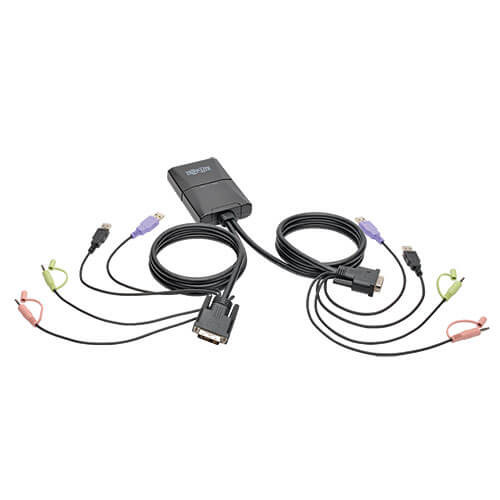
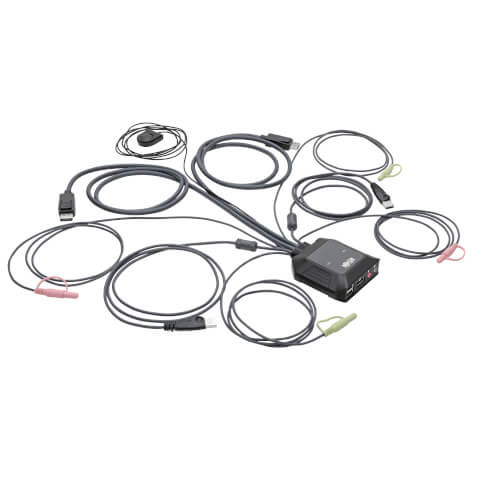
This Desktop KVM/Docking Station lets you access, control, boot and reboot 2 USB-C sources at the same time. Both USB-C sources share one HDMI monitor, USB keyboard and USB mouse, which saves space on your desk or workspace.
Supports USB-C DisplayPort Alternate Mode for Transmitting Audio/Video Signals
By connecting the included USB-C cable to a source device that supports USB DisplayPort Alt Mode, you can output 4K video and digital audio to a compatible monitor, television or projector without installing special software drivers. The B003-HC2-DOCK1 lets you build a workstation for multitasking by giving you the ability to extend screens, connect USB peripherals and switch between sources with ease.
Transmits Crystal-Clear 4K Video
The HDMI port support 4K resolutions up to 3840 x 2160 at 30 Hz.
USB Hub Lets You Share Peripherals between Computers
The built-in two-port USB 3.1 Gen1 hub allows you to share USB peripherals, such as printers, hard drives, scanners, webcams and flash drives, between both connected computers/sources. The hub is backward compatible with USB 2.0 and 1.1 devices.
USB-C PD 3.0 Charging Port Charges the Connected Notebook, Tablet or Other Device
The USB-C Power Delivery 3.0 port supports power output up to 85W, which is sufficient for charging and powering the connected source device, such as an Android smartphone or Chromebook. Just connect the device’s AC wall charger to the USB-C PD port.
Switching Between Computers Is Fast and Easy
Connect the included remote port selector to the specified port on the B003-HC2-DOCK1 and simply press the button anytime you want to switch between your USB-C sources. White LEDs indicate which computer is currently selected.
Cables Are Included for Fast and Simple Setup
Connect your two USB-C sources using the included USB-C (M/M) cables. The plug-and-play B003-HC2-DOCK1 requires no drivers, so you can connect and use it immediately. It works with all major operating systems, including Windows and Mac.
Typical Applications
- Control 2 USB-C devices using one keyboard, mouse and HDMI display
- Extend or mirror your laptop or PC monitor on multiple displays to aid in multitasking and increase productivity
- Save money and space by sharing USB peripherals, such as a printer and external hard drive, between 2 connected computers
Package Includes
- B003-HC2-DOCK1 2-Port USB-C KVM Dock, Black
- Remote port selector
- (2) USB-C cables (M/M), 1 m
- Owner’s manual
System Requirements
- Source device(s) with USB-C output
- Display device with HDMI input
- Computer with Windows 10 and above, USB-C port and USB-C DisplayPort Alt Mode compliance
- Computer with Mac OS X 10.12 and USB-C port
- Smartphone with Android 8.0 and above, USB-C port and USB-C DisplayPort Alt Mode compliance
- iPad Pro 3rd gen (2018) with iOS 12.1 and above
- This USB-C KVM dock does not support Apple iPhone and MacBook Pro M1 Series computers


Specifications
OVERVIEW
| UPC Code | 037332256621 |
| Product Type | Docking Station; KVM Switch |
| Technology | HDMI |
| Host Connector | USB C (MALE) |
VIDEO
| Number of Monitors Supported | 1 |
| Video Ports | (1) HDMI (FEMALE); (1) USB C (FEMALE) |
| Video Ports Details | HDMI 1.4; HDCP 1.4 |
| Resolutions Supported | HDMI: 4K 30Hz (3840 x 2160) USB-C: 4K 30Hz (3840 x 2160) |
| Max Supported Video Resolution | 3840 x 2160 @ 30Hz |
| Max Supported Color Depth | 36-bit Deep Color |
DATA
| Data Ports | (2) USB A (FEMALE) |
| Data Ports Details | (2) USB-A - USB 3.2 Gen 1 (5 Gbps); (2) USB-C - USB 3.2 Gen 1 (5 Gbps) |
INPUT
| Bus Powered | Yes |
POWER
| USB Power Delivery (PD) Charging Support | Yes |
| USB Power Delivery (PD) Charging Specification | 3.0 |
USER INTERFACE, ALERTS & CONTROLS
| LED Indicators | Port 1/2 (White) |
CHARGING
| Total Charging Watts | 85 |
| Charging Ports Details | USB-C: 85W PD 3.0 (5V/9V/15V/20V) USB-C: 10W |
| Charging Ports | (1) USB-C: 85W Power Delivery (PD 3.0) |
PHYSICAL
| Color | Black |
| Material of Construction | Aluminum |
| Rackmountable | No |
| Unit Dimensions (hwd / in.) | 5.63 x 4.69 x 0.96 |
| Unit Packaging Type | Box |
| Unit Weight (lbs.) | 0.83 |
ENVIRONMENTAL
| Operating Temperature Range | 32 to 104°F (0 to 40°C) |
| Storage Temperature Range | -4 to 140°F (-20 to 60°C) |
| Relative Humidity | 0% to 80% RH, Non-Condensing |
| Power Provided to Connected Device(s) | USB-C PD 3.0 Port: 100W (20V/5A), USB-C Port 1: 85W, USB-C Port 2: 10W |
COMMUNICATIONS
| IP Remote Access | No |
CONNECTIONS
| Ports | 2 |
| PC/Server Connections | USB |
| Side A - Connector 1 | (3) USB C (FEMALE) |
| Side B - Connector 1 | HDMI (FEMALE); (2) USB A (FEMALE) |
| Computer Keyboard and Mouse Interface | USB |
| Console Keyboard and Mouse Interface | USB |
| Console Monitor Interface | HDMI |
FEATURES & SPECIFICATIONS
| Number of Users | 1 |
| NIAP-Certified Secure | No |
| Port Selection | Remote Selector |
| HDCP Specification | 1.4 |
| USB Hub Ports | Yes |
| Number of USB Hub Ports | 2 |
| USB Specification | USB 3.0 (up to 5 Gbps); USB 3.1 Gen 1 (up to 5 Gbps) |
| Driver Required | No |
| Cat5 KVM Switch | No |
STANDARDS & COMPLIANCE
| Certifications | Tested to CE, FCC, RoHS, REACH |
WARRANTY
| Product Warranty Period (Worldwide) | 3-year limited warranty |